Blendkit logo
  • Download Blendkit
  • Subscribe
  • Mission
  • Users
    • FAQ
    • Terms & conditions
      • Terms and Conditions
      • Privacy Policy
      • Refund Policy
    • Get Blender add-ons
    • Blendkit beyond Blender
      • Blendkit for Godot
      • Blendkit for Rhino
      • Blendkit for Maya
      • Blendkit for Unreal
    • Add-on troubleshooting
    • Licenses
      • Lincenses info
      • Linceses FAQ
    • Service status
    • Cookies
      • Cookie Policy
      • Cookie settings
  • Creators
    • FAQ
    • Overview
    • Terms and Conditions for creators
    • General Uploading info
    • Upload Models
    • Upload Materials
    • Upload Brushes
    • Upload Add-ons
    • Guidelines for add-on creators
    • Upload Scenes
    • Upload HDRs
    • Upload Printables
    • Blender Tutorials
    • Validation Statuses
    • Fair Share Redistributions
    • Affiliate program
    • Most common upload issues
  • News
  • About
    • Our team
    • Contact
    • Press Kit
    • Blender 3D Training
    • Job positions
  • Models
  • Materials
  • HDRI
  • Scenes
  • Brushes
  • PrintablesNEW
  • Add-onsNEW
  • Log In
  • Register

BK BD 25

Blender 3D Material Add-Ons

Free Plan

Get 76,690 free assets

Full Plan 33% off

Access the full library & enjoy 155,454 assets

Blender add-ons 33% off

Find free & paid Blender add-ons

Become creator

Share & sell your assets

Built by 3D artists, for 3D artists. Meet Blendkit →

All assets

Add-ons icon Add-ons

  • Models icon Models
    • Architecture
      • Building
        • Commercial Historic Private Sci-fi
        • Other building
        Door Exterior element
        • Bench Facade element Fence Fountain Playground Swimming pool Urban Environment
        • Other exterior element
        Floor Covering Molding / Carving Scenes Stairs Structure Wall Panel
        • 3D Panel Stone Panel Upholstery Panel Wood Panel
        • Other wall panel
        Window
      • Other architecture
      Character
      • Anatomy
        • Full Body Head Internal organ Limbs Skeleton
        • Other anatomy
        Animal
        • Bird Dinosaur Fish Insect Mammal Reptile
        • Other animal
        Clothing
        • Accessories Footwear Headwear Lingerie Man Clothing Woman Clothing
        • Other clothing
        Humanoids
        • Child Fantasy Hero/ Heroines Medical Men Military Police Sci-Fi Sports Women
        • Other humanoids
        Monster / Creature Robot
      • Other character
      Decoration
      • Bag / Suitcase Blanket Book Carpets Clock / Watch Curtain Decoration Set Fabrics Fireplace Food / Drinks
        • Beverage Food Fruit / Vegetable Kitchenware Sweets / Dessert Tableware set
        • Other food / drinks
        Holiday Decoration Mirror Money Picture Pillow Sculpture Textile Vase Miscellaneous
      • Other decoration
      Effects / Simulations
      • Modifier Motion design Simulations Technical
      • Other effects / simulations
      Industrial
      • Container Equipment Machinery Parts Sign Tools
        • Handtools Powertools
        • Other tools
      • Other industrial
      Interior
      • Armchair Bathroom furniture
        • Accessories Bathhub Faucet Furniture Set Laundry Shower Toilet / Bidet Towel rail Wash Basin
        • Other bathroom furniture
        Bed Cabinets
        • Bookcase Commode Shelving TV Cabinets
        • Other cabinets
        Chair
        • Bar Chair Regular Chair
        • Other chair
        Console Dressing Table Kids furniture
        • Bed Chair Furniture Set Miscellaneous Table Toy Wardrobe
        • Other kids furniture
        Kitchen Furniture
        • Faucet Kitchen Appliance Kitchen Set Sink Storage
        • Other kitchen furniture
        Lights
        • Ceiling Light Floor Lamp IES Light Industrial Light Outdoor Light Table Lamp Wall Light
        • Other lights
        Office Furniture
        • Chair Desk Stationery Storage Table
        • Other office furniture
        Outdoor Furniture Pouf Restaurant / Bar Seating Set
        • Chair-table Set Sofa-table Set
        • Other seating set
        Shopping / Retail Sideboard / Drawers Chest Sofa Table Wardrobe
      • Other interior
      Military
      • Aircraft Vehicles Watercraft Weapon / Armor
        • Historic Modern Sci-Fi
        • Other weapon / armor
      • Other military
      Nature
      • Atmosphere
        • Cloud Fog Smoke / Fire Wind Setup
        • Other atmosphere
        Grass Landscape
        • Environment Elements Terrain
        • Other landscape
        Plant
        • Bouquet Fitowall Indoor Outdoor
        • Other plant
        Tree
      • Other nature
      Science
      • Lab Equipment Medical Equipment Microbiology Miscellaneous Pharmacy
      • Other science
      Space
      • Miscellaneous Planet Satellite Spacecraft Station
      • Other space
      Sport / Hobby
      • Fishing Gym Hobby Accessories Miscellaneous Music
        • Accessories Instruments Stage Studio
        • Other music
        Sport
      • Other sport / hobby
      Technology
      • Audio Devices Computer
        • Components / Hardware Desktop Game Console Keyboard Laptop Monitor Mouse Peripheral
        • Other computer
        Device
        • Cellular Phone Corded Phone Smartphone Smart Watch Tablet
        • Other device
        Home Appliance Miscellaneous Photography Robotics Video devices
      • Other technology
      Transport
      • Aircraft
        • Accessories / Part Air Baloon Airplane Drone Glider Helicopter Historic Plane Private Jet Seaplane
        • Other aircraft
        Bicycle Car
        • Buggy Concept Historical Luxury / Supercar Modern Racing Sci-Fi
        • Other car
        Emergency
        • Ambulance Fire trucks Police
        • Other emergency
        Heavy Vehicle
        • Industrial Trailer Truck Van
        • Other heavy vehicle
        Motocycle
        • Historical Race Standard
        • Other motocycle
        Public Transport
        • Bus Taxi
        • Other public transport
        Railed vehicle
        • Cargo Passenger
        • Other railed vehicle
        Small Electric Vehicles Vehicle Parts Watercraft
        • Accessories / Part Boat Hovercraft Ship Submarine Yacht
        • Other watercraft
      • Other transport
    • Other models
  • Materials icon Materials
    • Animal Asphalt Bricks Ceramic Concrete Dirt Fabric
      • Blackout Chenille Dimout Embroidery Flat weave Jacquard Print Sheer Suede Texture Velvet Vinyl / Imitation leather
      • Other fabric
      Floor Food Fx Glass Grass Ground Human Ice Leather Liquid Marble Metal Organic Ornaments Paper Paving Plaster Plastic Rock Roofing Rubber Rust Sand Soil Stone Tech Tiles Wood
    • Other materials
  • HDRIs icon HDRIs
    • Indoor
      • Abstract Futuristic Environments Holiday Industrial Interiors Nighttime Environments Public Residential Rural Sports Studio
      • Other indoor
      Outdoor
      • Abstract Architectural Cityscapes Futuristic Environments Holiday Landscapes Nature Nighttime Environments Sports Urban Water Environments
      • Other outdoor
    • Other hdris
  • Scenes icon Scenes
    • Abstract Cartoon Exterior
      • Architectural Nature Post-apocalyptic Private Public Rural Urban
      • Other exterior
      Gaming Industrial Interior
      • Creative studios
        • Photography Studios TV Studios YouTube/Podcast Studios
        • Other creative studios
        Interior Isometric Private Public
      • Other interior
      Product visualization
      • Cloth viz Mockup Studio
      • Other product visualization
      Science Templates
      • Background Brush templates Magazine cover Typography Validation scenes
      • Other templates
      Thematic Scenes
      • Fantasy Historical Holiday Sci-fi Space Underwater
      • Other thematic scenes
    • Other scenes
  • Brushes icon Brushes
    • Anatomy
      • Animal / creature
        • Claws Face / head Feather Fins Fur Limbs Organs Scales Scars & wounds Skeleton Skin Spikes Tails & horns
        • Other animal / creature
        Human
        • Body Face Hair & nails Muscles Organs Scars & wounds Skeleton Skin
        • Other human
      • Other anatomy
      Art
      • Pattern Sculpture
      • Other art
      Clothing
      • Accessories Fabric Stitches
      • Other clothing
      Damage
      • Concrete Crack Cut Dirt Glass Metal Plaster Rust Wood
      • Other damage
      Geometric Industrial
      • Hard surface Sci-fi
      • Other industrial
      Misc Nature
      • Crater Fire Ice Landscape Organic Plant Rock Soil Stone Wood
      • Other nature
    • Other brushes
  • Node Groups icon Node Groups
    • Compositing Nodes Geometry Nodes
      • Curves
        • Curve Deformers Curve Optimizers Curve Shapes
        • Other curves
        Distribution
        • Arrays Distribution Transform Surface Distribution Volumetric Distribution
        • Other distribution
        Generators
        • Animations Curve Generators Measurements Mesh Generators Voxel Generators
        • Other generators
        Material
        • Colors
        Math
        • Functions Interpolations
        Selection
        • Falloffs Select by
        • Other selection
        Simulation
        • Diffusions Particle Physics
        • Other simulation
        Tools
        • Edit / Object mode
        • Other tools
        Topology
        • Mesh Deformers Mesh Primitives Remeshers Tessellate Mesh
        • Other topology
        Utilities
        • Rotation Switches Text / String Tools UV Vector Fields Visualizers
        • Other utilities
      • Other geometry nodes
      Shading Nodes
      • Effects Procedural Textures
      • Other shading nodes
  • Printables icon Printables
    • Containers Fashion Games Holders Instruments Mechanics Misc Organics
    • Other printables
  • Add-ons icon Add-ons
    • 3D View Add Mesh Animation Development General Import - Export Material Mesh Modeling Node Object Paint Render Rigging Scene System Tools User Interface UV
  • Creators icon Creators
  • Creations icon Creations
YouTube Facebook Instagram GitHub TikTok BlueSky Mastodon
  • Trending  
  • Most bookmarked  
  • Highest asset score  
  • Highest complexity  
  • Highest quality  
  • Asset count  
  • Asset score sum
  • Newest
  • Most relevant
  • All
  • Free
  • Full
  • Paid
  • All assets
  • My bookmarked assets
  • All
  • 0 - 999
  • 1,000 - 9,999
  • 10,000 - 99,999
  • 100,000 - 999,999
  • 1,000,000 and more
  • All
  • Less than 256
  • 256
  • 512
  • 1K
  • 2K
  • 4K
  • 8K
  • 16K and more
  • All
  • Sculpt
  • Texture paint
  • All
  • Procedural
  • Texture based
  • All
  • Realistic
  • Non photorealistic
  • Other
  • All
  • Yes
  • No
  • All
  • Geometry nodes
  • All
  • Yes
  • No
  • All
  • Yes
  • No
  • All
  • No Sexualized Content
  • Sexualized Content
  • All
  • Yes
  • No
  • All
  • Windows
  • MacOS
  • Linux
  Bookmarks
The asset was added to your bookmarks.
Now you can filter it in Blendkit add-on.
  Bookmarks
The asset was removed from your bookmarks
  Bookmarks
Your rating could not be saved. Please try again.

Surface Bake Pro

add-on add-on

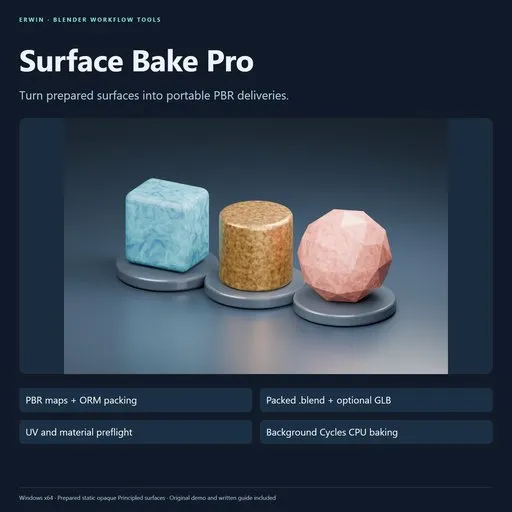
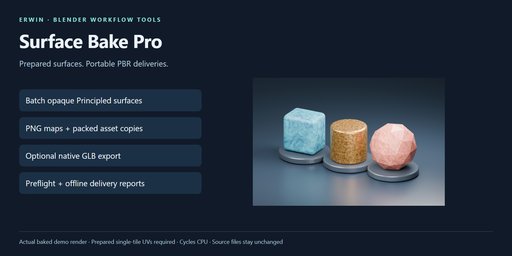
Bake prepared opaque Principled meshes into PBR texture sets, ORM maps, packed asset copies and optional GLBs, with UV preflight and offline delivery reports.
$24
Share on Twitter Share on Facebook Share on Reddit Share link
Image 1
Image 2
Image 3
Image 4
Image 5
Surface Bake Pro

Stop repeating the same image-target setup, map baking and output organization for
every prepared mesh. Surface Bake Pro turns selected static, opaque Principled
surfaces into organized PBR texture deliveries in a separate Blender process.

Included workflow
  • Preflight material compatibility, external textures, evaluated geometry and UVs.
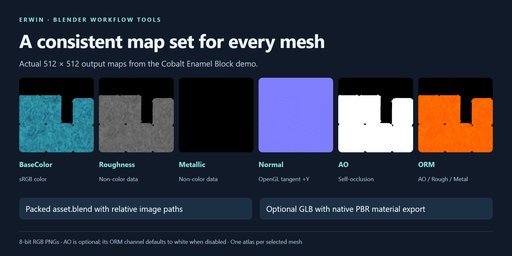
  • Bake BaseColor, Roughness, Metallic and OpenGL tangent Normal PNGs.
  • Optional self-occlusion AO; automatically pack AO/Roughness/Metallic into ORM.
  • Bake every used material slot into one atlas per selected mesh.
  • Write a packed, marked asset.blend and an optional native-exported GLB per mesh.
  • Review progressive offline HTML/JSON reports with file dimensions and SHA-256.
  • Cancel between maps or force-stop this plugin's worker; incomplete assets remain staged.
  • Keep the original project mesh, shader nodes, assignments and source files unchanged.

Three original procedural swatches, prepared UVs, full Python source and an offline
written guide are included. No account, activation, subscription or external Python
package is required by the extension. It uses Cycles CPU and Blender's native glTF exporter.

Requirements and limits

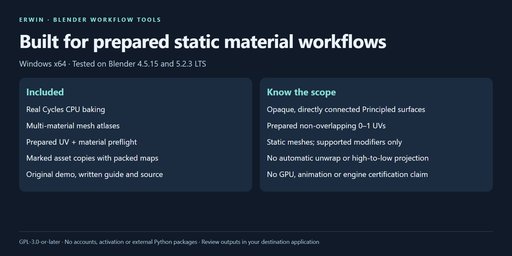
Windows x64, verified in Blender 4.5.15 and 5.2.3 LTS. Prepared static local meshes
with non-degenerate single-tile 0–1 UVs and opaque materials directly connected to
one Principled BSDF. Review overlap warnings and island gutter spacing before baking.

This release does not unwrap UVs, project high-to-low meshes, bake animation, use
the GPU, or fully convert arbitrary/mixed/transparent/displaced shaders. Unsupported
rigs, simulation, geometry nodes, material features and missing dependencies are
blocked rather than silently accepted. See the complete guide for exact scope.

Outputs are 8-bit RGB PNGs; smaller textures lose detail. Normal maps use +Y tangent
space. ORM uses R=AO, G=Roughness, B=Metallic. AO is per-object self-occlusion and
is not baked into BaseColor. Native GLB export is not destination-engine certification.
Inspect the actual materials and appearance in your target application.

Internal work files include a source-copy.blend containing the whole scene, not
only the selection. Keep work files and logs private. Share reviewed committed
asset folders and reports, never incomplete .partial folders.

GPL-3.0-or-later. Use the purchase platform's creator messaging for support, with
Blender version, exact error and a minimal non-confidential reproduction scene.


Surface Bake Pro 1.0.0

Turn prepared static Blender surfaces into organized PBR texture deliveries.
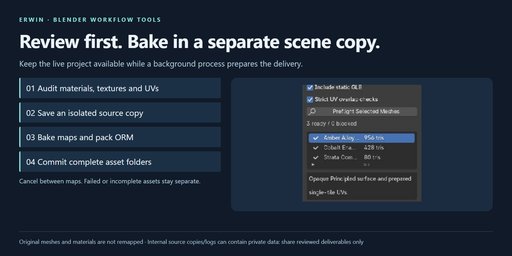
Select mesh objects, review the preflight, and bake in an isolated background
scene copy while keeping your live materials and meshes unchanged.

What is included
  • One texture atlas per selected mesh, including its used material slots.
  • BaseColor, Roughness, Metallic and OpenGL tangent-space Normal PNGs.
  • Optional per-object self-occlusion AO; ORM packing is always generated.
  • A separate asset.blend per successful mesh, with packed material images and
    a marked object asset. Optional self-contained GLB via Blender's native exporter.
  • Progressive offline HTML/JSON reports with filenames, PNG dimensions and SHA-256.
  • Material/texture/UV preflight, bounded overlap checks, cancellation between maps,
    worker force-stop, per-asset failure isolation and whole-asset staging/commit.
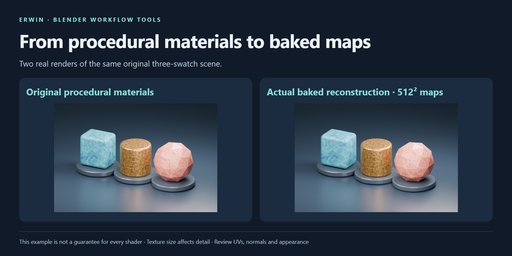
  • Three original procedural material swatches, prepared UVs, source and written guide.
Install and start

Verified platform: Windows x64. Targeted Blender builds: 4.5.15 LTS and 5.2.3 LTS;
consult the included TESTING.md for actual completed checks.

In Blender, open Edit → Preferences → Get Extensions → menu → Install from Disk.
Select surface_bake_pro-1.0.0.zip without extracting it, and enable the extension.
Press N in the 3D Viewport and select Surface Bake. No pip, external application,
account, activation or network service is required by the extension. Cycles and
NumPy are bundled with the verified Blender builds; Blender itself is not included.

  1. Save your project. For practice, click Example to open a separate writable copy
    of the included scene. Opening an example refuses unsaved/dirty projects.
  2. In Object Mode, select the prepared meshes. Each selected mesh gets its own atlas.
  3. Choose the texture size, Cycles samples, pixel margin and CPU thread limit.
  4. Enable AO and GLB if needed. Keep Strict UV checks enabled unless you have
    reviewed a reported overlap or incomplete audit and accept its bake implications.
  5. Click Preflight Selected Meshes, inspect the list, and fix blocked findings.
  6. Choose a short output folder and click Bake PBR Delivery. The start rescans selection.
  7. Review the final report and inspect the committed textures and assets. Open an
    asset.blend using File → Append or point an Asset Library at the delivery folder.
    Import the GLB into your actual destination application for a visual check.
Prepared-source requirements

This release supports local, visible, static mesh objects with opaque materials.
Every used material must directly connect one Principled BSDF to its active
Material Output. Procedural color/roughness/metallic inputs, shader node groups
feeding those inputs, and bump/normal inputs can be baked. The active UV map must
have non-degenerate triangles inside one 0–1 tile. The same UV layout is retained
in the baked asset copy and used for baking and tangent normals.

Unwrap and leave adequate space between islands before baking. Overlap checks find
positive-area intersections and ignore triangles that merely share an edge. They
stop after a fixed work limit; Strict UV blocks an incomplete check. A clean audit
does not certify sufficient pixel gutter or a visually correct unwrap. Dilation can
still bleed between nearby islands. Smaller textures can lose detail.

Linked/overridden objects, linked materials, constraints, animation/drivers, shape
keys, particles, instances, rigs, simulations and geometry nodes are blocked. Only
enabled Bevel, Subdivision Surface, Triangulate, Weighted Normal and Normal Edit
modifiers are supported, with matching viewport/render visibility. Supported
modifiers are evaluated into the delivered static copy, not applied to your source.

Alpha must be unlinked and equal to one. Transmission, coat, sheen, subsurface,
emission, volume and material displacement are unsupported. Use default IOR,
Specular IOR Level and anisotropic level. Mixed/grouped surface shaders,
OSL/scripted nodes and camera/ray-dependent shaders are unsupported. Convert
generated/UDIM/sequence/movie images into saved still files before baking.
Missing files and unsaved image pixel edits block an asset.

This is not high-to-low projection, automatic retopology/UV unwrapping, lightmap
baking, a complete conversion of arbitrary shaders, GPU acceleration or animation
export. The worker uses Cycles CPU. Complex materials and 4K textures can take
substantial time and memory. Supported batches have at most 24 selected objects,
250,000 evaluated triangles per object and 128–4096 square texture presets.

Map conventions

All map files are square 8-bit RGB PNGs. BaseColor stores sRGB color; scalar maps,
normal maps and ORM store non-color data. Normal uses OpenGL tangent-space +Y;
convert it outside this release if your target expects a different convention.
ORM is R = AO, G = Roughness, B = Metallic. When AO is disabled its ORM channel is
white. AO is baked with other scene objects hidden from rendering, so it is
self-occlusion, not scene contact lighting. AO is not multiplied into BaseColor.
The simple baked material exposes ORM occlusion to the native glTF exporter.

The baked material uses the base-color, ORM and normal maps. Separate Roughness,
Metallic and optional AO PNGs are also supplied for workflows needing individual
maps. Exported texture channels are quantized to 8 bits and are not a lossless
representation of arbitrary procedural shaders. Appearance depends on UV quality,
normal interpretation, lighting, color management and the destination renderer.
No Unity, Unreal, Godot, mobile or web-engine certification is claimed.

Source preservation and delivery files

Each batch creates a unique directory. Your current source .blend is not saved over;
the worker opens a separate saved copy with embedded script execution disabled.
The live mesh, shader nodes, materials, transforms and image paths are not remapped
by the bake worker. Opening the example is a separate explicit scene switch.

Each successful mesh commits a directory containing the PNG maps, asset.blend and
optional asset.glb. A failed/cancelled mesh can leave a .partial directory. Partial
directories are work files and must not be delivered. There is no resume feature in
1.0: rerun into a new batch. Completed asset folders from earlier in a cancelled
batch remain available for review. No existing delivery is overwritten or deleted.

Internal source-copy.blend contains the entire original scene, not only selected
meshes. job.json and worker.log can contain names and local paths. Keep these work
files private and share only reviewed committed asset folders and reports. The
per-asset .blend contains only the baked mesh's dependency tree, with its material
maps packed and relative image paths. It is not the original complete scene.

The source copy can reference original external dependencies. Keep those files
available and unchanged until the worker finishes. Your live scene can be edited
after the copy is made, but those later edits do not enter the running job. Keep
Blender open; disabling the extension terminates its own worker.

Cancellation and failures

Cancel After Current Map writes a cancellation marker. Cycles finishes the current
map before cancellation is observed. An incomplete asset is not committed. For a
stalled bake, request cancellation and use Stop Worker Now; files remain on disk.

complete means every selected mesh committed. complete_with_issues means at least
one mesh was blocked or failed. cancelled, interrupted and failed indicate a batch
that did not complete normally. Read the findings and inspect outputs before use.
One failed asset does not prevent later eligible assets from baking.

License and support

GPL-3.0-or-later; full source and the original demo assets are included. Use your
purchase platform's creator messaging channel for support, with Blender version,
the precise error and a minimal non-confidential reproduction scene. No sales or
income outcome is guaranteed by this software or its marketplace materials.

By

Author avatar erwin newman

File size

2.3 MiB

Version

1.0.0

Platforms

windows-x64

Minimal required Blender version

4.5.15

Texture Upscaler - Offine Image Upscaler For Blender
Free

add-on Texture Upscaler - Offine Image Upscaler For Blender

39
Simple Outliner
Free

add-on Simple Outliner

32
Matshelf
Free

add-on Matshelf

30
AI Material Generator
Free

add-on AI Material Generator

29
Shader Ops
Free

add-on Shader Ops

17
DRH - Scene Material Inventory
Free

add-on DRH - Scene Material Inventory

17
Surface Blend

add-on Surface Blend

12
QuickMat Bake Lite - Material to Texture Converter
Free

add-on QuickMat Bake Lite - Material to Texture Converter

11
Material Organizer
Free

add-on Material Organizer

10
PBR Texture Generator

add-on PBR Texture Generator

9
Texel Density Tools
Free

add-on Texel Density Tools

8
Right-Click PBR
Free

add-on Right-Click PBR

8
Ultimate ToonShader Generator

add-on Ultimate ToonShader Generator

6
Palette Manager Pro — Color Palette System For Blender (Pro Tier)

add-on Palette Manager Pro — Color Palette System For Blender (Pro Tier)

6
Texture Maps Generator  - PBR Maps from One Image

add-on Texture Maps Generator - PBR Maps from One Image

6
BLENDER <-> Substance Painter Live Link

add-on BLENDER <-> Substance Painter Live Link

5
Texture Transfer - High-Poly to Low-Poly Texture Baking

add-on Texture Transfer - High-Poly to Low-Poly Texture Baking

5
📽️Reel Director PRO: Turn Blender Scenes Into Instagram,Tiktok & Youtube Shorts

add-on 📽️Reel Director PRO: Turn Blender Scenes Into Instagram,Tiktok & Youtube Shorts

5
Cool Magic Shader

add-on Cool Magic Shader

4
Texture baking image buddy
Free

add-on Texture baking image buddy

4
The Bakery : One click material baker

add-on The Bakery : One click material baker

4
🎞️ Reel Director: Turn Blender Scenes Into Instagram, Tiktok & Youtube Shorts

add-on 🎞️ Reel Director: Turn Blender Scenes Into Instagram, Tiktok & Youtube Shorts

4
Rimlighter

add-on Rimlighter

3
Procedural Sky System

add-on Procedural Sky System

2

  • «
  • 1
  • 2
  • 3
  • …
  • 18
  • 19
  • 20
  • »
Added To Cart
To complete your purchase or update it, please go to cart. If you want to find more awesome add-ons, continue to explore.
Go to Cart
Already Purchased
You already purchased this item. It is impossible to buy it again. Continue to explore and enjoy :-)
My Orders