
 Models
 Materials
 HDRIs
HDRIs
 Scenes
 Brushes
 Node Groups
 Printables
 Creators
 Creations
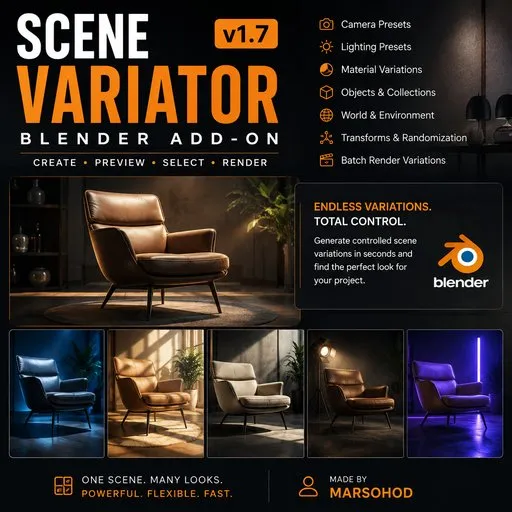
Scene Variator v1.7 — Controlled Scene Variations
 add-on
Create controlled scene variations in Blender using camera and lighting presets, materials, objects, collections, World settings and transforms. Preview, select and batch render multiple variations from a single scene.
Scene Variator v1.7 — Controlled Scene Variation for Blender
Create multiple professional variations of a single Blender scene without rebuilding cameras, lighting, materials and scene settings manually.
Scene Variator gives you a controlled workflow for generating camera angles, studio lighting setups, material variations, object and collection combinations, World settings and transforms.
Create. Preview. Select. Render.
Designed for product visualization, stock content production, asset presentation and any workflow where multiple versions of the same scene are needed.
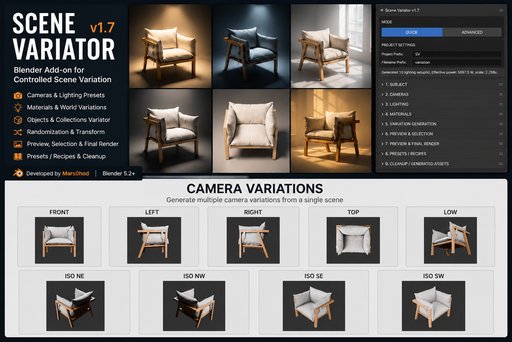
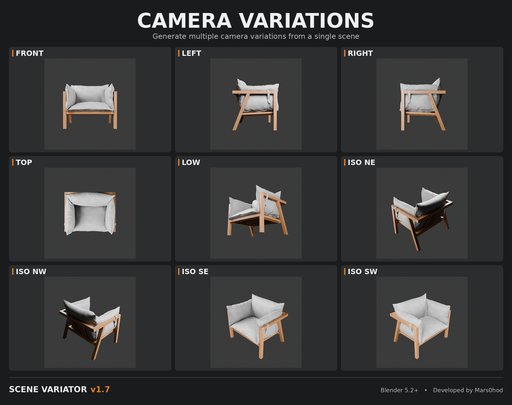
Camera & Lighting Variations
Scene Variator includes 12 ready-to-use camera presets and 10 studio lighting presets for quickly creating different views and lighting conditions from a single scene.
Camera presets provide consistent angles around the subject, while lighting presets create a range of studio-style setups. Automatic light power adjustment helps adapt the lighting to the size of the selected subject.
Combine camera and lighting variations to produce multiple visually distinct renders without manually rebuilding the scene for every shot.
Materials, Objects & Collections
Go beyond camera and lighting changes by varying the actual content of your scene.
• Material variation and randomization
• Object variation sets
• Collection variation sets
• Controlled combinations of scene elements
Create multiple visual versions from a single Blender scene without manually rebuilding every setup.
World, HDRI & Transform Variations
Expand scene variation beyond cameras, lighting and materials.
• Randomize World background settings
• Create HDRI rotation variations
• Randomize object transforms
• Control position, rotation and scale variation
• Generate repeatable results using seeds
Add subtle or dramatic changes while keeping the original scene structure under control.
Preview, Select & Batch Render
Generate variations, preview the results and choose exactly which versions you want to render.
• Preview generated variations before final rendering
• Select the variations you want to keep
• Batch render multiple selected variations
• Use consistent project and filename organization
• Reduce repetitive manual setup between renders
Generate. Preview. Select. Render.
QUICK & ADVANCED Workflows
Choose the workflow that matches the level of control you need.
QUICK Mode provides fast access to the essential Scene Variator tools, including ready-to-use camera and lighting presets for rapid variation generation.
ADVANCED Mode gives you detailed control over the complete workflow — cameras, lighting, materials, objects, collections, World settings, transforms, generation, preview and rendering.
Start quickly when you need results fast, or switch to ADVANCED when you want precise control.
Presets & Recipes
Save your favorite Scene Variator configurations as reusable presets and recipes.
Reuse successful combinations of settings instead of rebuilding the same workflow every time.
This is especially useful for repeated product visualization, stock production and projects that require consistent sets of scene variations.
Controlled Randomization
Random does not have to mean unpredictable.
Scene Variator uses seed-based generation, allowing you to reproduce generated results and experiment with new combinations while maintaining control over the variation process.
Adjust the parameters you want to vary, keep the rest of the scene unchanged, and generate new combinations when needed.
Built for Production
Scene Variator is designed to reduce repetitive setup work when producing multiple renders from the same Blender scene.
Ideal for:
• Product visualization
• Stock content production
• Asset presentation
• Look development
• Lighting and camera exploration
• Creating multiple render variations
One scene. Many possibilities.
Compatibility
Version: Scene Variator v1.7
Blender: 5.2 or newer
Render Engines: Cycles and Eevee
Platforms: Windows, macOS and Linux
Scene Variator is a Blender Python add-on and does not require external applications or additional libraries.
Installation
Scene Variator is distributed through BlenderKit in the Blender Extensions format.
Install the add-on through BlenderKit, then open the 3D Viewport and press N to display the sidebar.
Open the Scene Variator tab to start working with the add-on.
License & Support
Scene Variator is distributed under the GNU General Public License v3.0 or later (GPL-3.0-or-later) in accordance with Blender add-on requirements.
Developed and maintained by Mars0hod.
If you encounter an issue, please include your Blender version and a short description of the problem when reporting it.


