 Models
 Materials
 HDRIs
HDRIs
 Scenes
 Brushes
 Printables
 Add-ons
 Creators
 Creations
 Node Group
Led Strip Lighting Dots For Area Lights
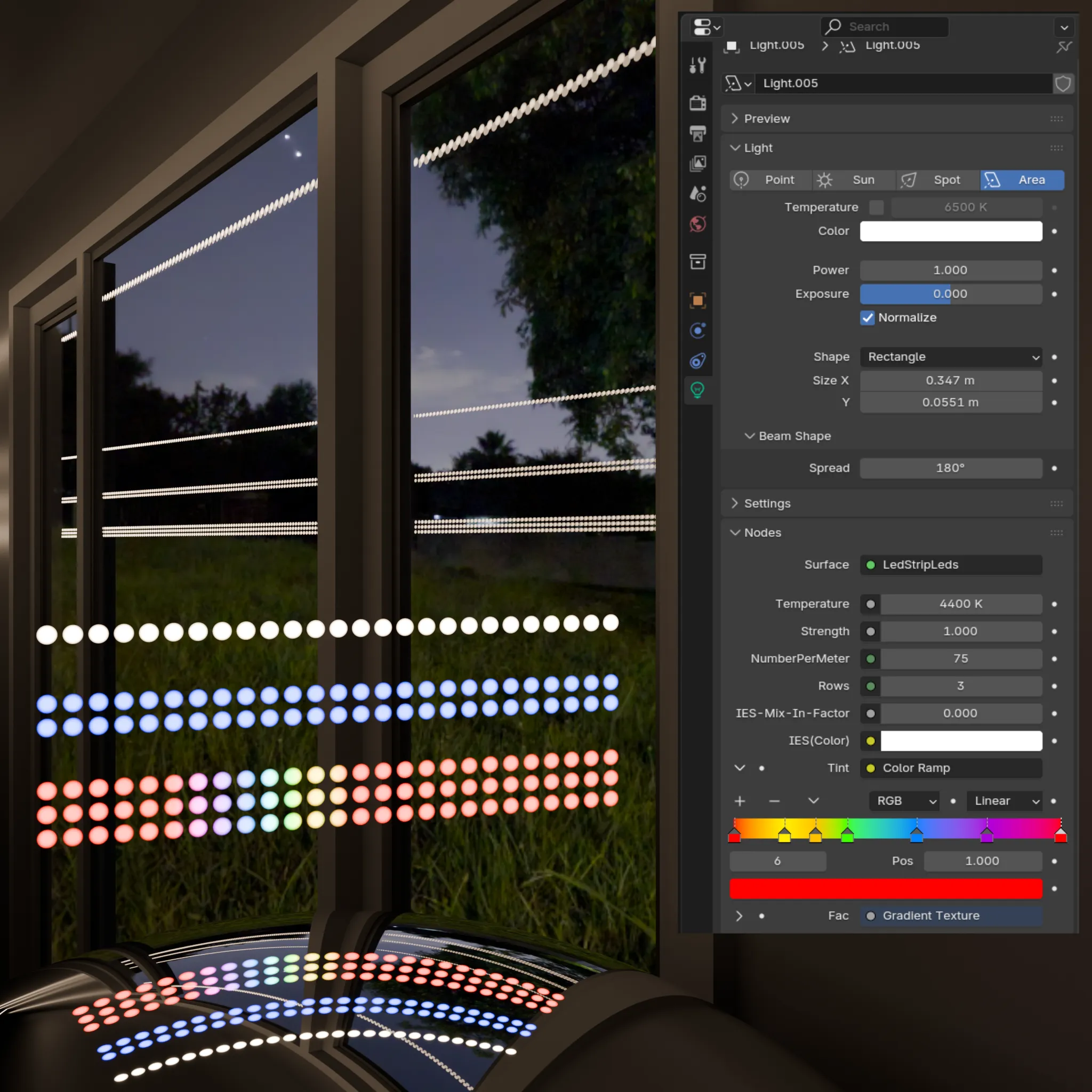
Get this Node GroupLed strip round light emission map for Area lights
(leds represented as white light emitting circles on the area light surface, and can be colored)
Made for Cycles
Intended to be used with Area lights.
Can be used on geometry with limitations.
- Add Led Strip dots to an Area light's surface node.
- In the Area Light's Object Properties -> Visibility -> Ray Visibility enable Camera
- Go to the Area Light's Object Data 💡 (Object Data Properties) -> Nodes, or select the Area light and open the Shader Editor. There you can:
* Choose color temperature: 2800 = warm, 4000 = newtral, 5500 = cold. You can experiment and go beyond this values
* Choose the strenght of the light emission
* Choose the number of leds per meters
* Choose number of led rows for your "strip": from 1 up to 4
* Color them as you like by applying any color to the Tint group input in the Area Light's Object Data (Object data properties 💡), or in the Shader Editor
If you want to add it to an object use the Shader output and use plane only.
Due to a way UV coordinates work, the lights are being generated always from the center and the middle. of your plane/polygon on geometry or the middle center of your Area lights.


