
 Models
 Materials
 HDRIs
HDRIs
 Scenes
 Brushes
 Node Groups
 Printables
 Creators
 Creations
Wiki IA: Your Agent inside Blender
 add-on
Your Agent inside Blender 4.2+ and 5.x. Conversational chat, local RAG, web search, and 1-click safe Python script execution.
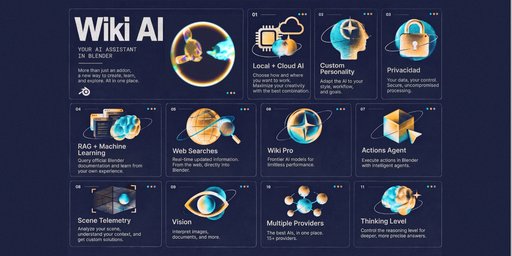
Wiki IA integrates artificial intelligence directly into your Blender 3D Viewport and Text Editor. Built natively for Blender 4.2+ LTS and 5.x, it acts as your personal technical copilot: inspecting live scene telemetry, searching the web, using local semantic RAG, and generating execution-ready Python code with full Undo (Ctrl + Z) protectionand a review-first safety filter.
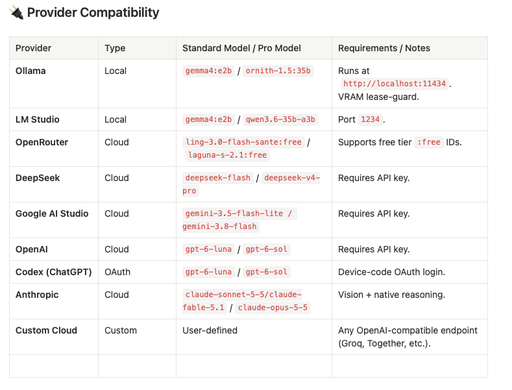
Works with 100% private local models via Ollama and LM Studio (no account or API key required), ChatGPT device-code OAuth (Codex), or cloud providers (DeepSeek V4, OpenRouter, Google AI Studio, OpenAI GPT-6 Sol/Luna, Anthropic Claude Fable/Opus, Qwen, MiniMax, Grok, Z.ai, StepFun, and custom OpenAI-compatible endpoints).
Key Functional Features
🤖 Multimodal & Intelligent Conversational Assistant:
- Real-Time Scene Analysis (Auto Telemetry): The AI queries live data from your .blend file (meshes, rig, materials, modifiers, nodes, render engine, your entire scene, and system status) to give you context-accurate answers.
- Multimodal Support: Attach images (.png, .jpg, .webp) for vision if the model supports it, or code and text documents (.py, .json, .csv, .md) directly into the chat.
🛡️ Safe Python Script Executor (Actions Agents):
- 1-Click Execution (Play): Run generated scripts live.
- AST Security Sandbox: Filters and blocks dangerous system commands (os, subprocess, file deletion) before they execute.
- Safe Undo (Ctrl + Z) Integration: Every execution creates a safe restore point. If a script fails, your scene won't break, and the AI analyzes the error to automatically self-correct the code.
🧠 Semantic Memory & Local RAG (100% Private Knowledge Base):
- Native Blender 4.2+ / 5.x Knowledge: Ships out-of-the-box with information on API changes (EEVEE Next, Geometry Nodes, BSDF).
- Custom Sync: Add your own .md / .txt guides or documentation to the local knowledge folder without sending your data to the cloud.
- Auto-Learn: Save technical solutions directly from your chats into semantic memory with a single button.
🌐 Integrated Live Web Search:
- Real-time grounding using the Tavily API or DuckDuckGo when asking for information about recent Blender updates or industry news.
⚡ Compatibility with 18+ AI Providers and Local Models:
- Powerful Local Models (Private & Free): Via Ollama or LM Studio.
- Cloud Models: DeepSeek, OpenAI, Anthropic Claude, Google AI Studio, OpenRouter, Z.ai, Qwen, MiniMax, Xiaomi, NVIDIA NIM, xAI (Grok), OpenCode Zen, or any custom OpenAI-compatible endpoint.
- Configurable Thinking/Reasoning Levels: Fine-tune reasoning depth per provider.
👻 Ghost Mode & Multiple Sessions:
- Keep conversations 100% in RAM memory without leaving a trace on disk when working on confidential projects.
- Blender Version: 4.2 LTS or 5.x (Extension System enabled).
- Permissions: FILES (RAG & chat history), NETWORK (AI backends & web search), CLIPBOARD (code copy).
- Dependencies: Fully bundled with Python + NumPy (included with Blender). No pip installation required.
Local Use (Ollama / LM Studio):
- No account, no API key required.
- RAM: 8 GB minimum (~4B models) | 16 GB recommended (7–9B models).
- Disk: ~3–6 GB free per model.
Cloud Providers:
- Requires active internet connection + provider API key or OAuth subscription. No GPU/RAM requirements.
- Download Wiki_ia_v1.0.0.zip.
- In Blender 4.2+ / 5.x, go to Edit > Preferences > Get Extensions.
- Click [v] (top right) → Install from Disk... and select the .zip.
- Open panel in 3D Viewport or Text Editor sidebar (N key) → Wiki IA tab.
❓ Frequently Asked Questions (FAQ)
1. Do I need a credit card or subscription to use Wiki IA?
No. Wiki IA does not require any paid subscription. You can use it 100% for free and privately by connecting it to local models via Ollama or LM Studio, or by using OpenRouter’s free tier. If you prefer cloud providers like OpenAI, Anthropic, or DeepSeek, you only pay for what you use directly through their respective API keys.
2. Which Blender versions are supported?
Wiki IA is built specifically for Blender’s new Extension System and is fully compatible with Blender 4.2 LTS onwards and Blender 5.x.
3. Is it safe to execute the Python code generated by the AI?
Yes. Wiki IA features a built-in AST Security Sandbox that inspects code before execution. If a script attempts to use dangerous system commands (such as altering operating system files or executing os/subprocess operations), execution is automatically blocked. Additionally, every run is wrapped in a safe restore point; if you don't like the result, you can simply revert the changes by pressing Ctrl + Z.
4. Are my .blend files or scene data sent to the cloud?
Only if you are using a cloud provider and have Auto Telemetry enabled. Telemetry only extracts structural scene metadata (object names, modifiers, nodes, render setup). If you require complete privacy, enable Ghost Mode and run a local model via Ollama or LM Studio: your data and conversations will never leave your computer.
5. How does Web Search work?
You can enable Web Search from the Features panel (+). When you ask a question that requires up-to-date information or news about Blender, Wiki IA performs a live search using the Tavily API (or DuckDuckGo as a fallback) and uses the results to deliver an accurate, grounded answer.
6. What is the Local RAG Memory and how do I use it?
RAG (Retrieval-Augmented Generation) is a local vector database stored directly on your machine. Wiki IA comes pre-seeded with grounding knowledge regarding Blender 4.2+ and 5.x API rules. You can add your own .md or .txt files to the local knowledge directory or use the Auto-Learn feature to save critical technical solutions from your chats straight into semantic memory.
7. What happens if a generated script throws an error in Blender?
Wiki IA includes an automated self-correction loop. When a script encounters a runtime error in Blender, the addon captures the error traceback, feeds it back to the AI model, and automatically attempts to fix and rerun the code (up to a maximum of 2 consecutive attempts).
8. Can I use my own API keys and custom models?
Yes. In the Addon Preferences, you can input your API keys for over 18 supported providers and configure custom OpenAI-compatible endpoints (such as Groq, Together AI, Fireworks, or local servers). You can also adjust the Thinking Level (reasoning effort) per provider.


